
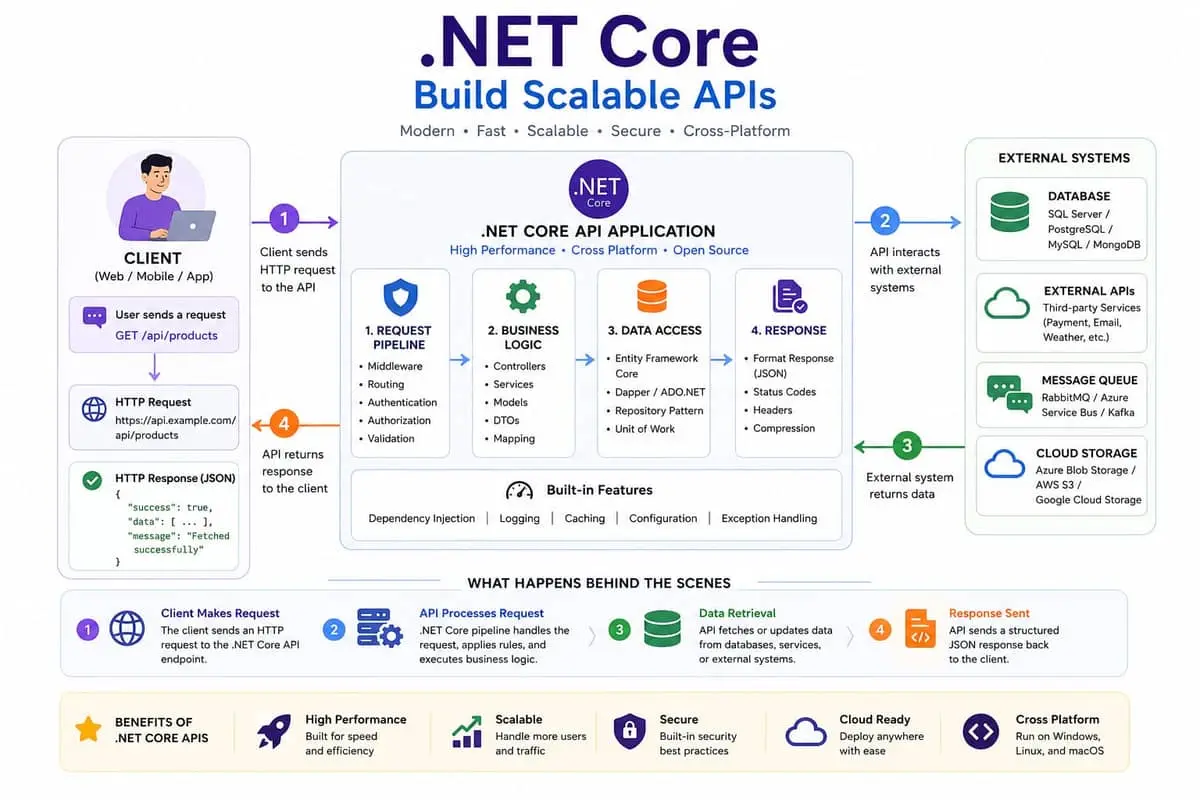
Why .NET Core?
.NET Core (now simply .NET 5+) is Microsoft's cross-platform, open-source framework for building modern applications. Unlike the legacy .NET Framework, .NET Core runs on Windows, Linux, and macOS, making it an ideal choice for cloud-native and containerized applications. Its performance consistently ranks among the fastest web frameworks in industry benchmarks like TechEmpower.
For API development, .NET Core offers a unified programming model that handles HTTP routing, middleware, dependency injection, and configuration out of the box. The framework is designed from the ground up for high concurrency and low memory footprint, with features like Span
Getting Started
Creating a new API project is straightforward. Install the .NET SDK, then run dotnet new webapi to scaffold a project. The default template includes a weather forecast endpoint that demonstrates the core concepts.
For simple services, .NET 6 introduced Minimal APIs — a streamlined approach that eliminates controllers and boilerplate. A complete "Hello World" API can be just a few lines:
var builder = WebApplication.CreateBuilder(args);
var app = builder.Build();
app.MapGet("/hello", () => "Hello World");
app.Run();
For larger applications, the controller-based approach provides better organization with separate files for routing, validation, and business logic. Both approaches can coexist in the same project, letting you choose the right pattern for each endpoint.
Middleware and Pipelines
.NET Core's request pipeline is built on middleware — components that process HTTP requests in sequence. Each middleware can inspect, modify, or short-circuit the request before passing it to the next component. The order matters: exception handling comes first, then authentication, authorization, routing, and finally the endpoint itself.
Common middleware includes UseAuthentication() for JWT validation, UseCors() for cross-origin requests, UseRateLimiter() for throttling, and custom middleware for logging, metrics, or request transformation. You can also write custom middleware by implementing the IMiddleware interface or using the convention-based approach with InvokeAsync.
Best Practices
Building production-ready APIs requires attention to several areas. For data access, Entity Framework Core provides a mature ORM with migrations, change tracking, and LINQ queries. Use async I/O everywhere with await to avoid thread pool starvation under high load.
For structured logging, Serilog is the de facto standard. Configure it at startup with UseSerilog() and write logs as structured events, not text strings. This enables powerful querying in tools like Seq, Elasticsearch, or Application Insights.
API documentation is handled by Swagger/OpenAPI via the Swashbuckle package. It generates interactive documentation from your code and attributes, making it easy for consumers to explore and test endpoints. Add XML comments to your controllers and enable IncludeXmlComments for inline documentation.
For error handling, use the ProblemDetails standard (RFC 7807) to return consistent error responses. The built-in UseExceptionHandler() middleware can catch unhandled exceptions and map them to proper HTTP status codes with structured error bodies.
Finally, always validate inputs. Use FluentValidation with the FluentValidation.AspNetCore package to separate validation logic from your controllers. Combined with .NET's built-in data annotations, this ensures every request is checked before reaching your business logic.