
Beyond Chatbots
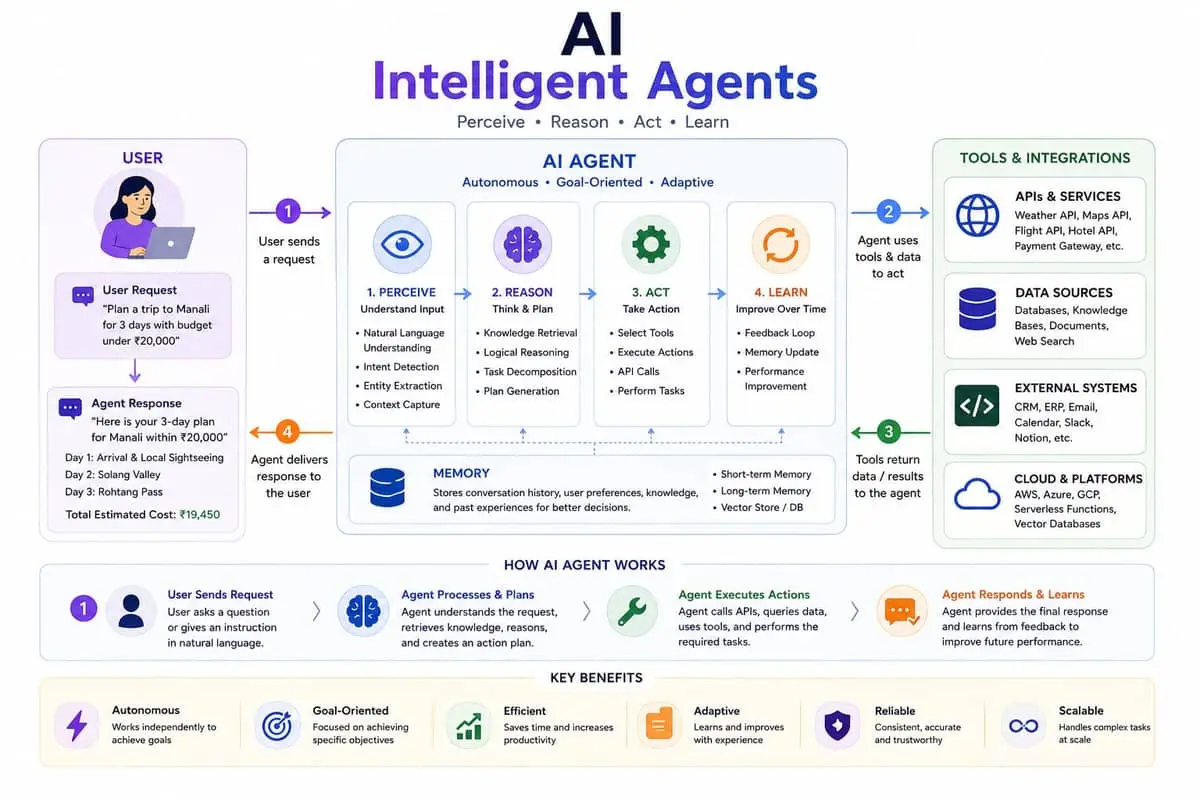
Most developers have used ChatGPT or Claude for Q&A, code generation, and debugging. But the real power of LLMs emerges when they stop being passive answer machines and start being active agents — systems that can reason, plan, execute actions, observe results, and adapt their behavior accordingly.
An AI agent is essentially a loop: the LLM receives a task, thinks about what steps are needed, calls tools to gather information or perform actions, observes the results, and continues until the task is complete. This pattern opens up possibilities far beyond chat — automated research, code review pipelines, customer support triage, and even software development workflows.
Key Components
Every AI agent needs three things to function effectively:
- An LLM for reasoning — the "brain" that understands the task, breaks it down into steps, and decides which tools to use. GPT-4, Claude 3.5 Sonnet, and open-source models like Llama 3 all work well. The key requirement is reliable instruction following and structured output (typically JSON).
- A set of tools — the "hands" that interact with the world. Tools can be APIs (search, email, Slack), code execution (Python REPL, shell commands), or data sources (databases, file systems, web pages). Each tool is defined by its name, description, input schema, and implementation.
- An orchestration loop — the "nervous system" that manages the conversation between the LLM and its tools. The loop sends the current state to the LLM, parses the response for tool calls, executes them, and feeds the results back into the next iteration.
Modern LLMs support function calling natively, meaning they can output structured JSON indicating which tool to call and with what parameters. This eliminates the need for brittle prompt parsing and makes the agent loop reliable and predictable.
Building Your First Agent
Let's walk through building a simple research agent using OpenAI's function calling API. The agent will take a question, search the web, read the results, and synthesize an answer.
Start by defining your tools. Each tool is a function with a JSON schema that describes its parameters. For example, a web search tool might accept a query string and return a list of URLs and snippets. A page reader tool accepts a url and returns the page text.
Next, set up the loop. Send the user's question along with the tool definitions to the LLM. If the response contains a tool_calls field, execute those tools and send the results back to the LLM as new messages. Continue until the LLM produces a final response without tool calls.
For production systems, consider using a framework like LangChain, CrewAI, or Microsoft AutoGen. These handle orchestration, memory, error recovery, and parallel tool execution out of the box. LangChain's AgentExecutor, for instance, provides retry logic, token tracking, and customizable stop conditions with just a few lines of configuration.
Common Patterns and Pitfalls
One common pattern is the ReAct (Reasoning + Acting) loop, where the model explicitly writes out its reasoning before each action. This improves traceability and helps the model stay on track. Simply include a "Thought:" step in your prompt: "First, think about what information you need, then call a tool."
A major pitfall is tool call fatigue — models getting stuck in infinite loops calling the same tool repeatedly. Mitigate this with a maximum iteration limit and a circuit breaker that triggers if the model repeats the same tool with similar parameters more than N times.
Another challenge is context window management. Each tool result gets appended to the conversation history, which can quickly exhaust the model's context limit. Strategies include summarizing old tool results, forgetting irrelevant history, or using a sliding window that drops the oldest messages.
Finally, always validate tool outputs before feeding them back to the LLM. Malformed data can confuse the model and lead to cascading errors. Parse, validate, and if necessary, sanitize results before they enter the reasoning loop.